TEAM
UX Architect (Me), Senior UX Researcher, UI Designer
TOOLS
Figma, Google Analytics 4, Microsoft Clarity, Miro
DURATION
April 2025 to Present
THE CLIENT
First Abu Dhabi Bank (FAB) is one of the largest banks in the UAE and the biggest client for VML Tech and Commerce in the region.
It offers a wide range of financial products including credit cards, loans, and investment services. The website plays a key role in customer acquisition, allowing users to explore products, compare benefits, and submit applications online.
OUR ROLE
Our team uses research and design to optimise the most critical acquisition journeys and improve how 4 million customers find, assess, and apply for financial products.
CHALLENGE
As the bank’s credit card portfolio expanded, customers were presented with a growing number of options on the website. While this increased choice, it also introduced the potential for greater complexity when exploring and understanding different cards and their benefits.
GOAL
Understand how customers discover, evaluate and apply for credit cards, and use these insights to identify opportunities to optimise their experience.

RESEARCH METHODOLOGY
We conducted mixed-methods research.
Google Analytics +
Microsoft Clarity Data Review
This would help analyse behaviour across the credit card journey to set a foundation for building a discussion guide and also support/challenge insights that come out of other research.
5 In-Depth Interviews with Elite Customers (earning an income >AED50,000)
Elite customers were harder to recruit at scale. Additionally, since they were eligible for all credit card options, we would be able to gain deeper insight into decision-making for customers that had a high number of options.
100 Survey Responses from Mass Customers (earning an income >AED5,000)
Mass customers were easier to reach through surveys, allowing us to validate behavioural patterns at scale.
KEY INSIGHTS

Customers begin their search with existing banks but will switch for tangible superior value.
MOTIVATION
"I already salary transfer to the same bank so it made sense [to get a card from the same bank]."
BEHAVIOUR
PAIN POINT
”But recently, I'm not happy with the, ADIB…in last two months, I'm trying to get a value. So, I want to check more the benefits of the value.”
Several participants leveraged AI for initial Credit Card discovery based on preferred criteria.
MOTIVATION
"I need a clear view and understanding of the cards available on the market"
BEHAVIOUR
”I told ChatGPT that my bank is charging me an annual fees for my
credit card. So I'm looking for, free for life credit card that still give me the benefits of the cashback."
PAIN POINT
Calculation of expected gains vs. costs is completed by most participants while comparing Credit Cards.
MOTIVATION
"If there were more benefits, way more than the value of the annual fee then I would be willing to pay it."
BEHAVIOUR
"Per month, I am spending for electric, for water, for school. So you can say from 15 to 20 thousand. If I'm not getting good cashback from that, it's unfair."
PAIN POINT
"You're giving me a cashback credit card. I barely get around 600 dirham a year. And then you are giving me 600 dirham annual fees. So what's the point?"
OPPORTUNITY EXPLORATION
The research findings were synthesised and presented in a stakeholder deck, alongside a set of recommendations.
Based on the insights, we identified several opportunities to better support customers during the selection process, including:
improving filtering to help customers narrow down relevant cards earlier in their journey
exploring AI-assisted discovery to support product exploration and comparison
introducing interactive tools that help customers estimate rewards rather than relying on mental calculation
EVALUATIVE RESEARCH
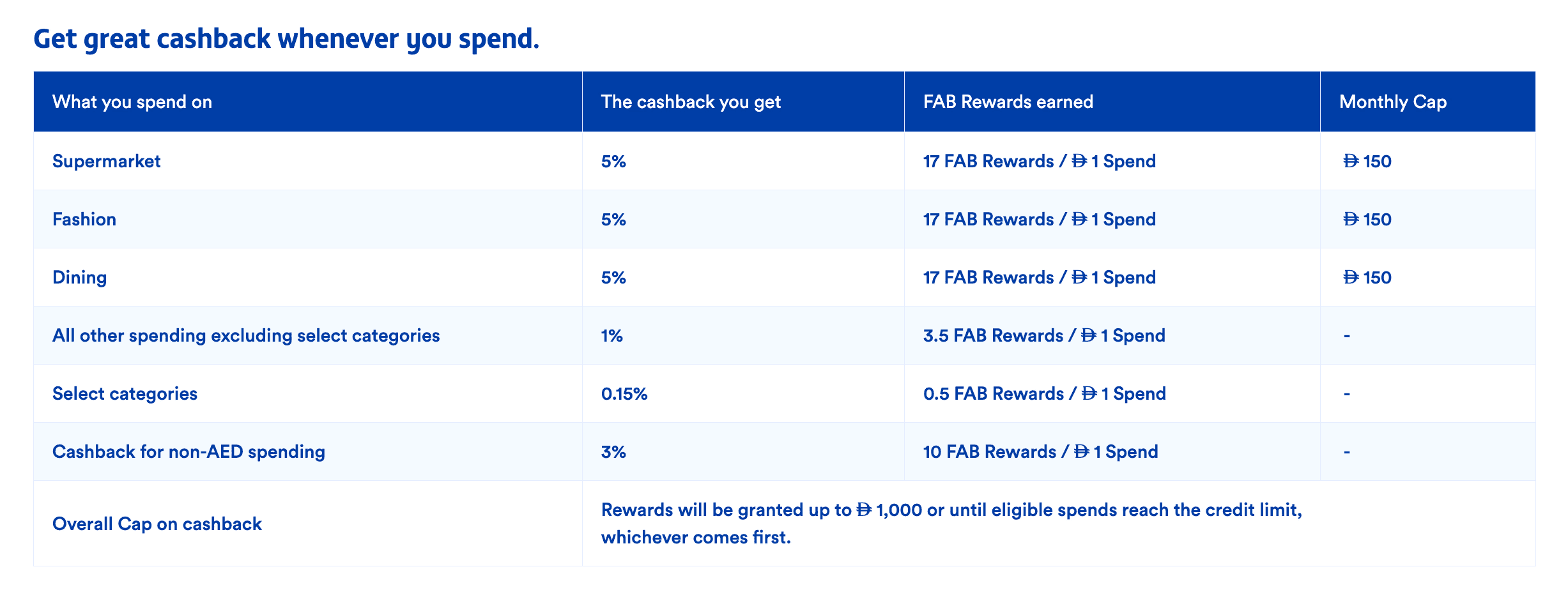
Before proposing any solution, we conduct evaluative research. For the calculator specifically, we wanted to get an idea of how customers currently interpret reward information on the website to validate/challenge the need for our recommendation.
Participants were shown the reward table used on one of the credit card pages (as shown below) and asked to explain the benefits they believed they would receive.
RESULTS
Reward mechanics were misunderstood.
-
Many participants assumed they would receive both cashback and FAB Rewards simultaneously, even when the card structure involved recieving FAB Rewards exclusively with the option of converting to cashback.
-
Some participants also required clarification of percentage values (for eg. customers receive 0.15% for select categories but participants though it was an additional 0.15% cashback)
Reward tables created cognitive friction.
-
Some participants wanted to know how rewards could be converted into other benefits and what they were
-
One participant wanted to know what 'select categories' were without having to access detailed terms
-
Another participant, who was currently in the market for a credit card and well-versed with the landscape suggested a calculator similar to what they had seen on another bank's website.

STAKEHOLDER ALIGNMENT
The findings and concept directions were presented to stakeholders.
While several opportunities were discussed, the idea of introducing a reward calculator resonated strongly as it would create both customer and business impact.
It offers a wide range of financial products including credit cards, loans, and investment services. The website plays a key role in customer acquisition, allowing users to explore products, compare benefits, and submit applications online.
PHASE 3 - DESIGN
BENCHMARKING
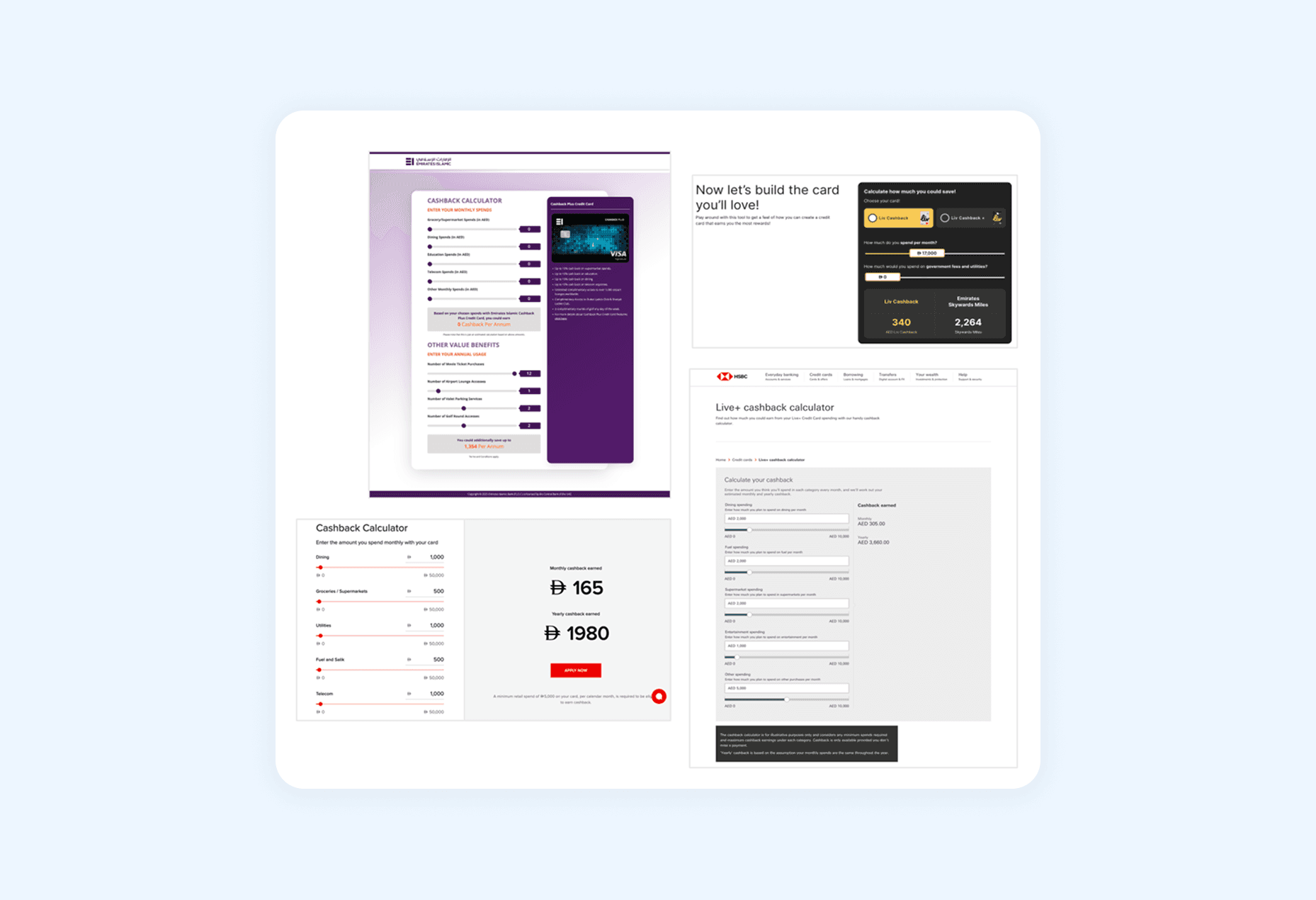
To understand how other financial institutions communicate reward value, we reviewed calculators from several regional banks including HSBC, Liv Bank, Emirates Islamic, and ADCB.
These were the few banks that even had a calculator for reward/cashback estimation. These local banks that had relatively different approaches to their cashback calculator.
-
All calculators for other banks had inputs for customers to enter their spending within certain categories on one side.
-
Input complexity varied, ranging from simple total spending inputs to detailed category-based breakdowns.
-
On the other side, all calculators had some presentation of rewards or cashback that aligned with their respective loyalty programs.
STRUCTURING THE EXPERIENCE
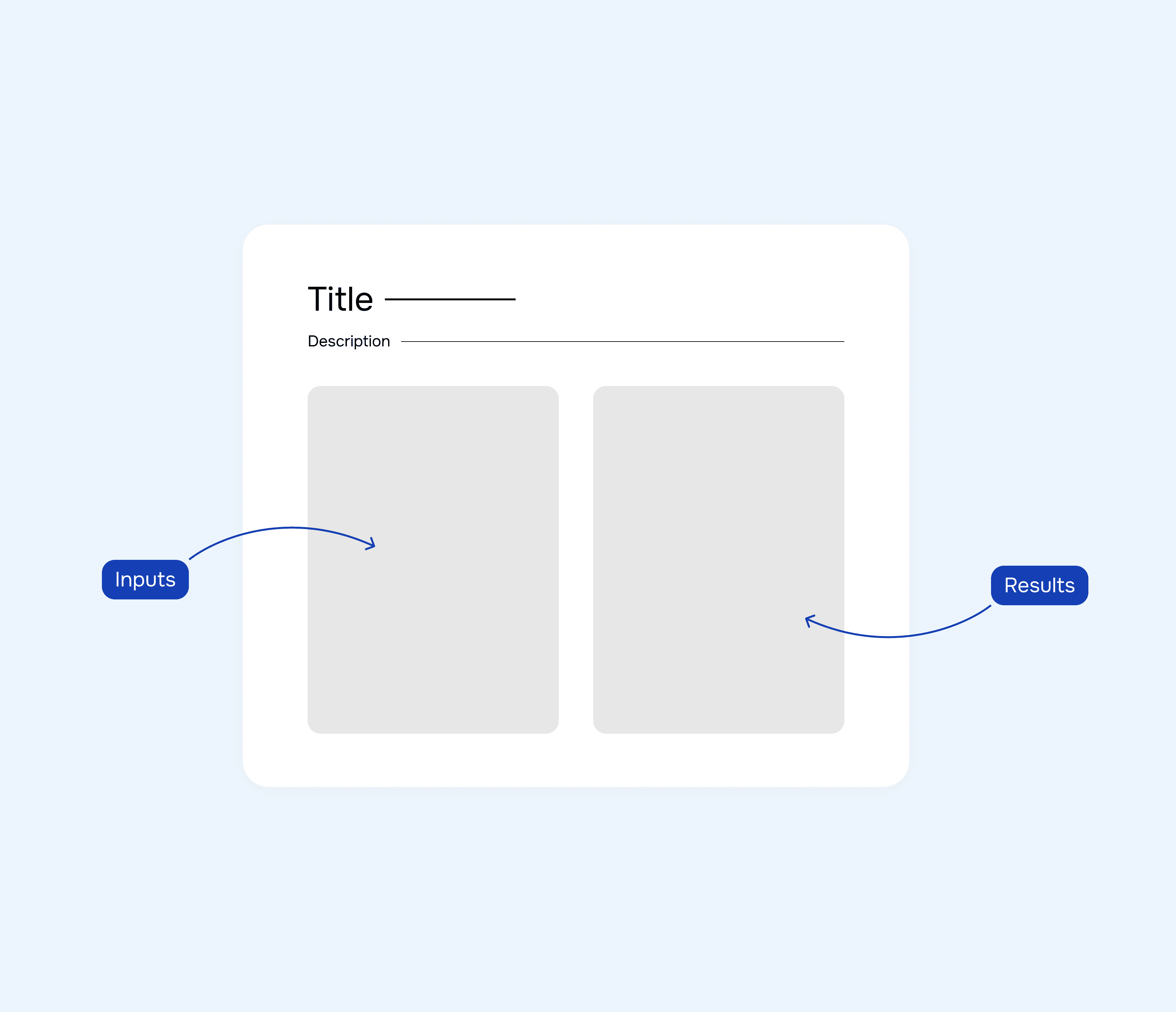
Based on the patterns from benchmarking, the calculator was designed with two primary areas: inputs and results side-by-side for immediate feedback.

CALCULATOR INPUTS
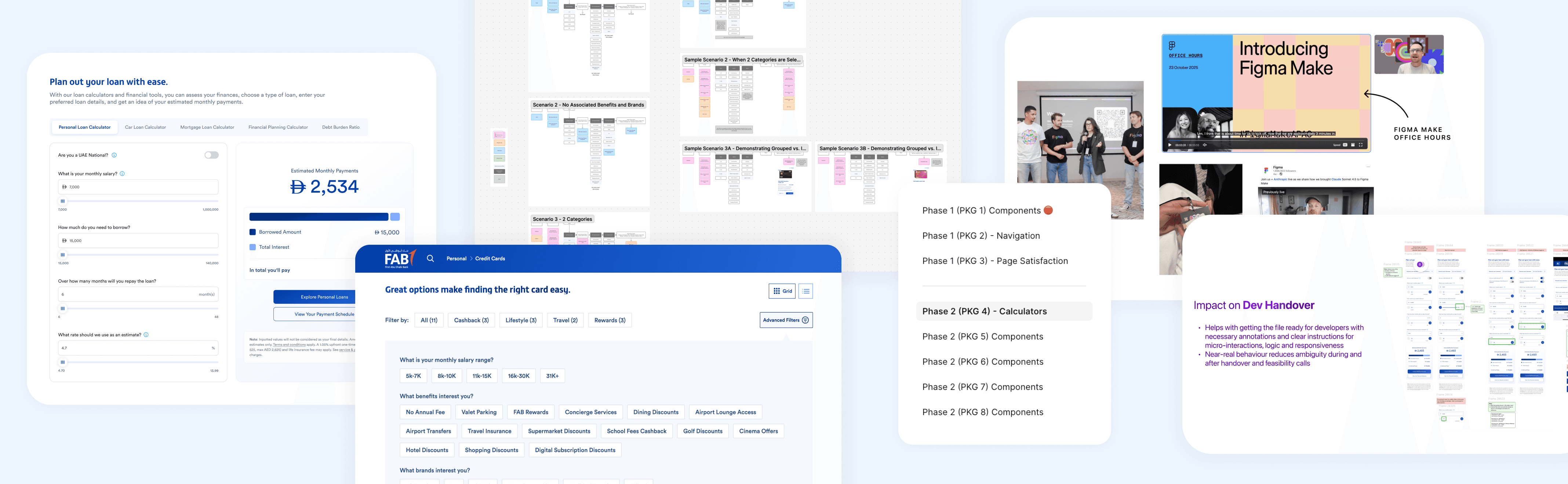
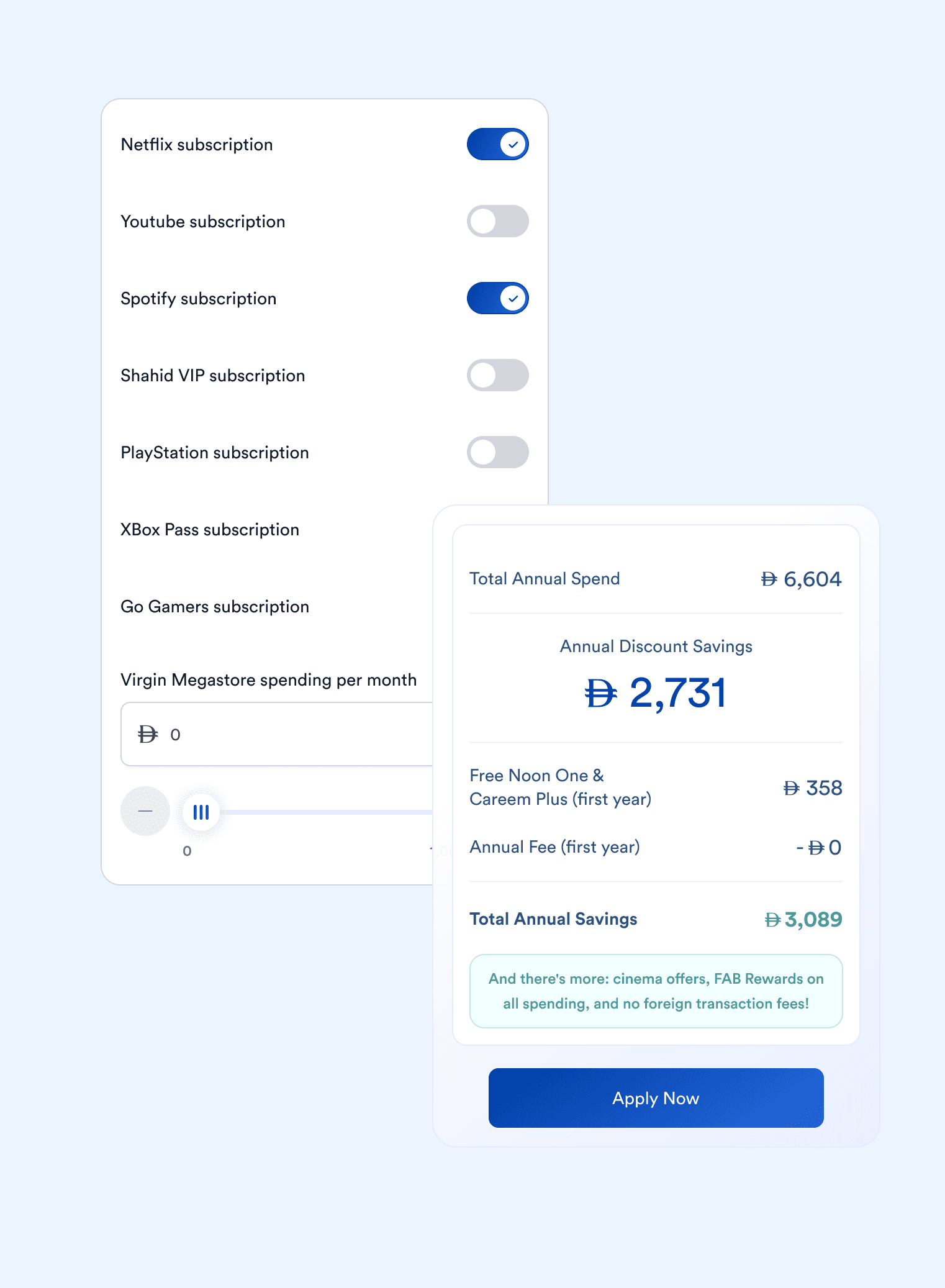
As part of earlier design system optimisation work, we had already refined input components at the atomic level. Because these components were already part of the design system, we were able to reuse proven input patterns.
When we were redesigning the input fields for tools, we conducted usability testing on loan calculators that we already had on the website to estimate monthly instalments.
Insights from this work informed how users prefer to enter and adjust financial values. The testing had shown that:
-
text inputs were the primary method for entering values
-
sliders helped users explore ranges
-
mobile required additional +/- controls for precise input
INTERACTION CONSIDERATIONS - COMPONENT DESIGN
Several interaction details were considered during that process to improve usability and accessibility.
Touch Target Optimisation
To ensure comfortability on mobile devices, the grip area expands when pressed, increasing the touch target size in line with NN/g guidelines.

Accessible Contrast Standards
Contrast levels were carefully defined for interactive elements such as sliders and +/- controls to meet WCAG accessibility standards.
Natural Value Increments
Increment values were defined carefully so that spending adjustments felt natural and aligned with typical spending ranges.
Supporting Continuous Feedback
When the input list becomes long, the results panel remains sticky to the bottom of the screen, ensuring users can always see it as they scroll.

Contextual Tooltips
An option to add tooltips was built into the component to provide contextual explanations when necessary.
CALCULATOR RESULTS
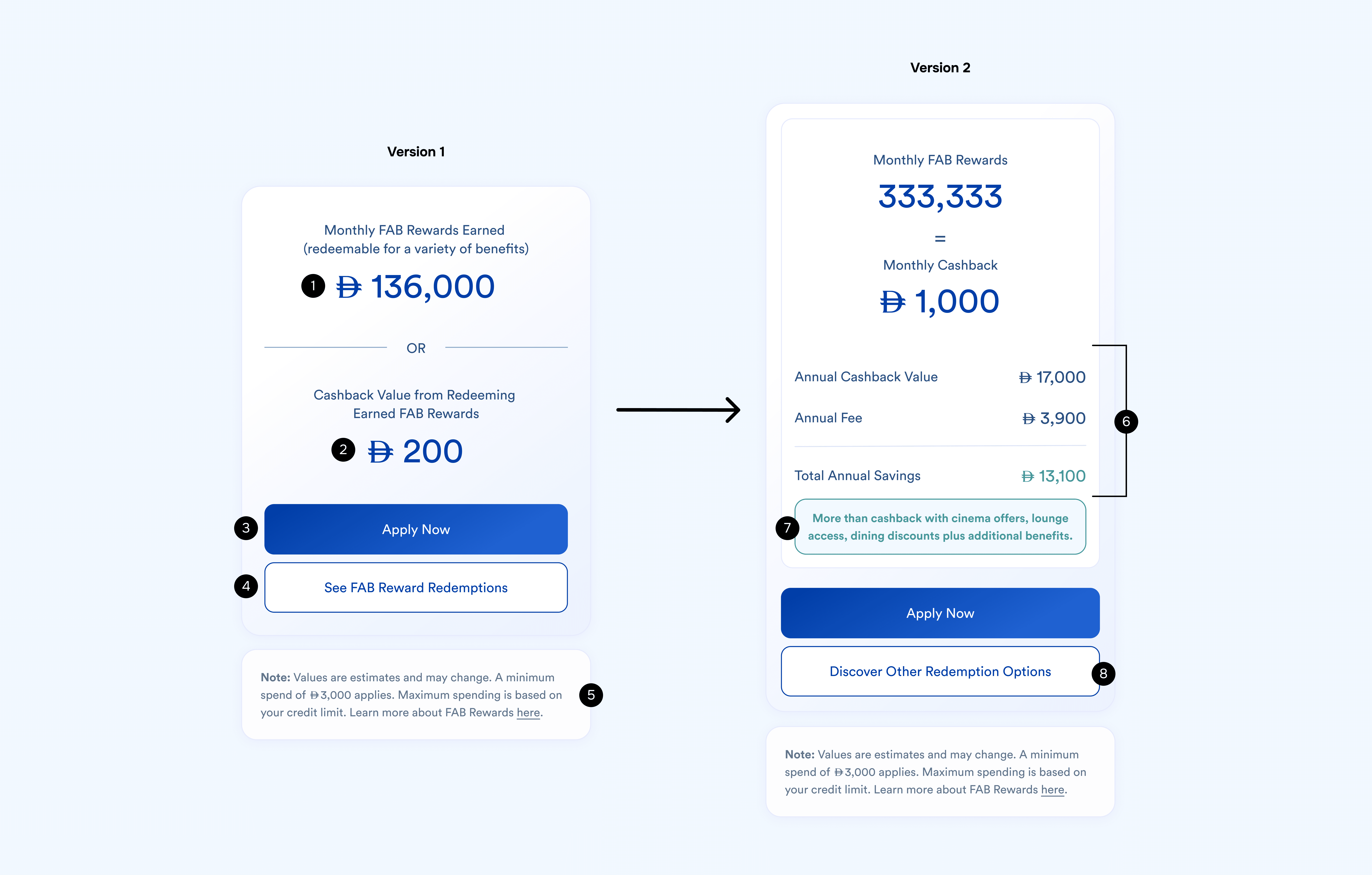
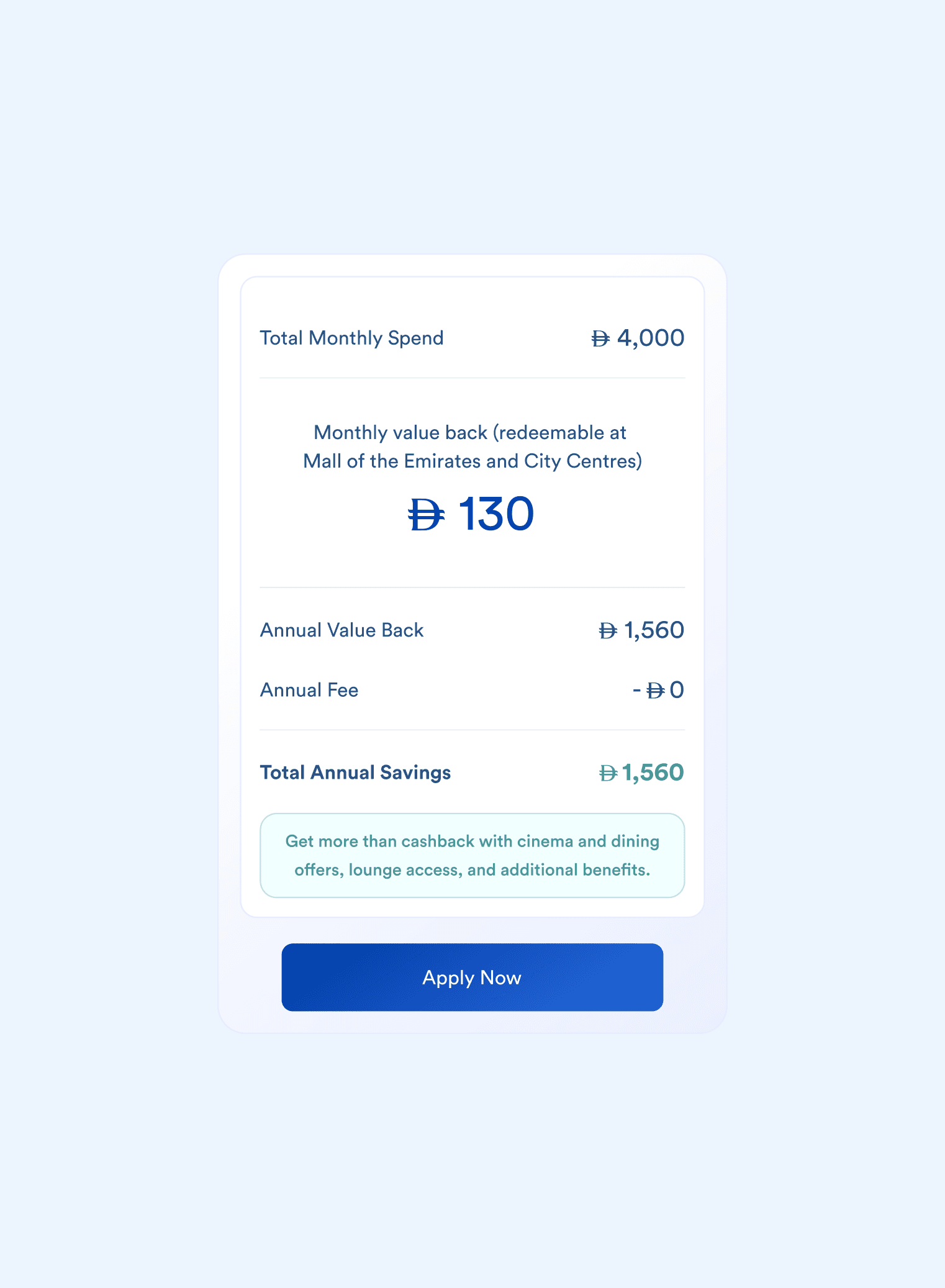
The results section was designed to translate complex reward mechanics into a clear and actionable estimate of value.
Version 1
1
FAB Rewards Earned
Calculates the total monthly FAB Rewards based on the user’s spending inputs and the card’s reward rules.
2
Cashback Value Conversion
Rewards are converted into their equivalent cashback value, helping customers understand the real monetary benefit without needing to interpret reward conversion rates.
3
Primary Conversion CTA
An Apply Now button allows customers to immediately begin the web application journey after seeing their estimated value.
4
Secondary CTA
A Discover Other Redemption Options button encourages users to explore the broader rewards ecosystem.
5
Transparency & Compliance
Indicative calculation notes and terms ensure clarity around reward caps and redemption conditions.
Version 2
A second iteration, post internal discussions and a design critique, introduced an additional layer to help customers understand the card value relative to its annual fee.
1
Net Value Calculation
Estimated rewards are compared against the card’s annual fee to show the net benefit customers could receive.
2
Conditional Messaging
Dynamic copy adjusts depending on whether the estimated rewards exceed the annual fee, helping set realistic expectations.
ADDITIONAL CONSIDERATIONS
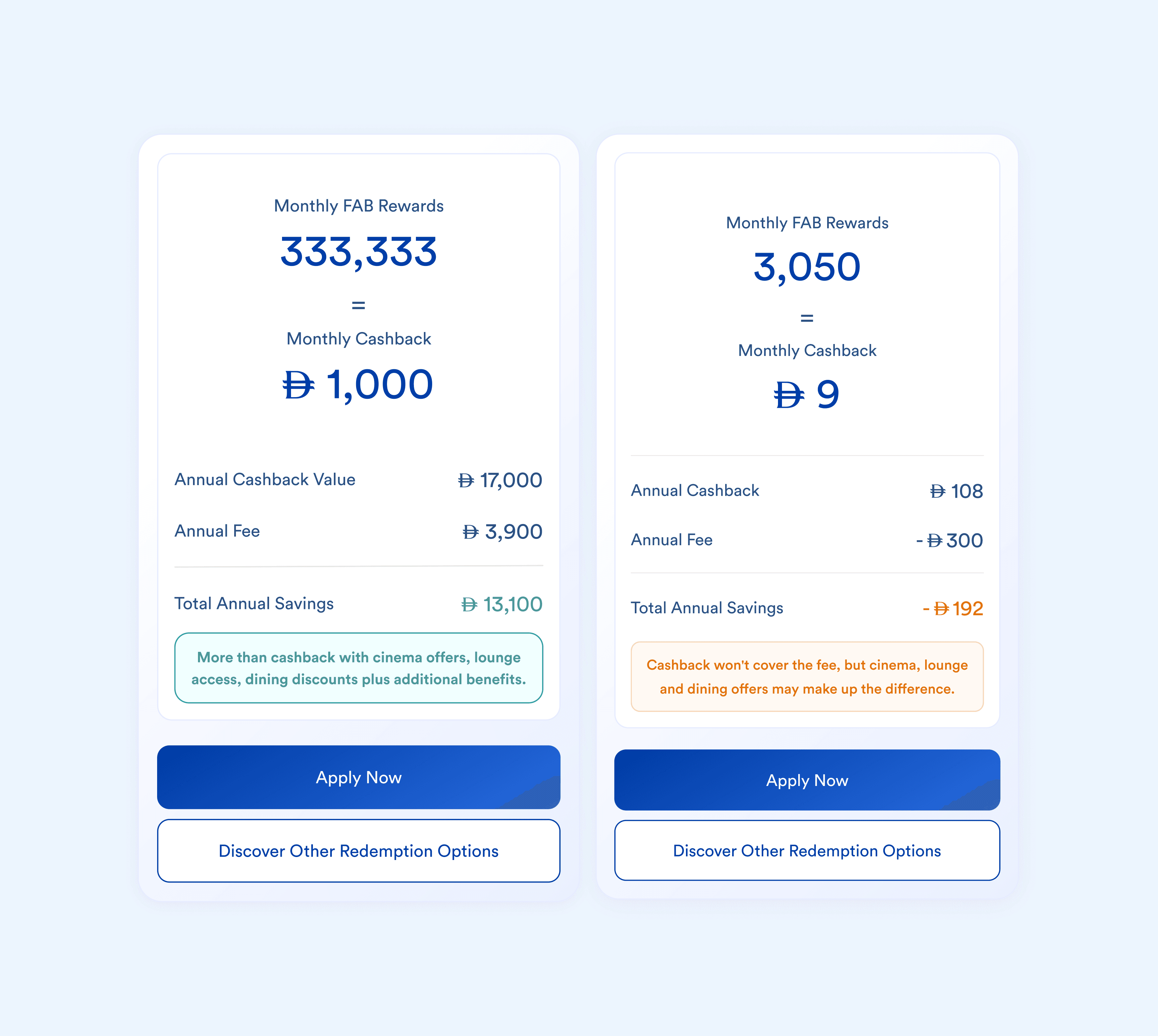
Colour-Coded Conditional Messaging
-
When rewards exceed the annual fee, messaging highlights the potential value customers could receive from the card.
-
If rewards fall below the fee, supporting copy reminds customers that additional benefits (lounge access, discounts, etc.) may still offset the cost.

Sticky Bottom Bar for Mobile
-
The bar is short and saves screen real estate.
-
It only appears once interaction begins (through sliders or text inputs), ensuring the interface remains uncluttered for customers who do not want to engage.
-
Customers quickly understand financial impact without having to scroll to results.
PHASE 4 - TESTING AND ITERATION
FIGMA MAKE PROTOTYPING
AI-assisted prototyping supported early testing, client validation, and development readiness.
-
Early validation and testing using a near-final design would enable quick iteration based on observed friction rather than assumptions
-
Micro-interactions (sticky bars, smooth sliders, feedback states) could be visualised early to assess usability and comfort
-
Mobile flows could be put directly in clients’ hands during stakeholder meetings, reflecting real usage (70%+ of users engage on mobile)
-
Clearer interactions would support a smoother development handoff and give more control to our design team to design our expectations

KEY IMPROVEMENTS FROM TESTING
1
Preventing misleading reward perception
Entering large spending values in low-reward categories made the card appear less valuable. During testing, some users entered high rent amounts (AED 9,000–10,000). Because rent earned only 0.15% cashback, it overshadowed higher-reward categories and reduced the perceived value of the card.
Change: Low-reward categories were removed from the calculator inputs to still keep the results meaningful and transparent for customers while positively reflecting the business.
2
Clarifying reward timeframes
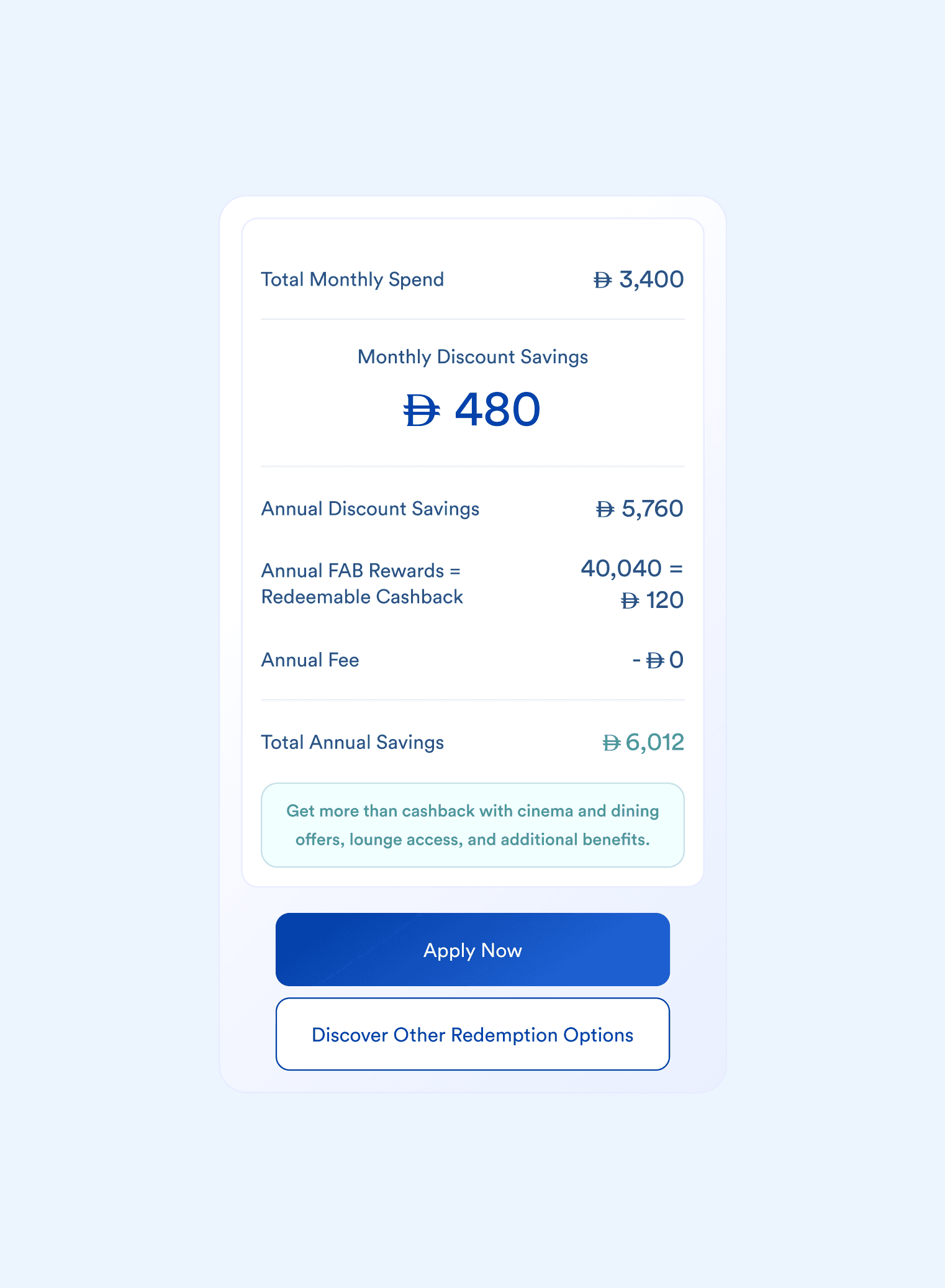
Participants were unsure whether reward estimates represented monthly or annual value.
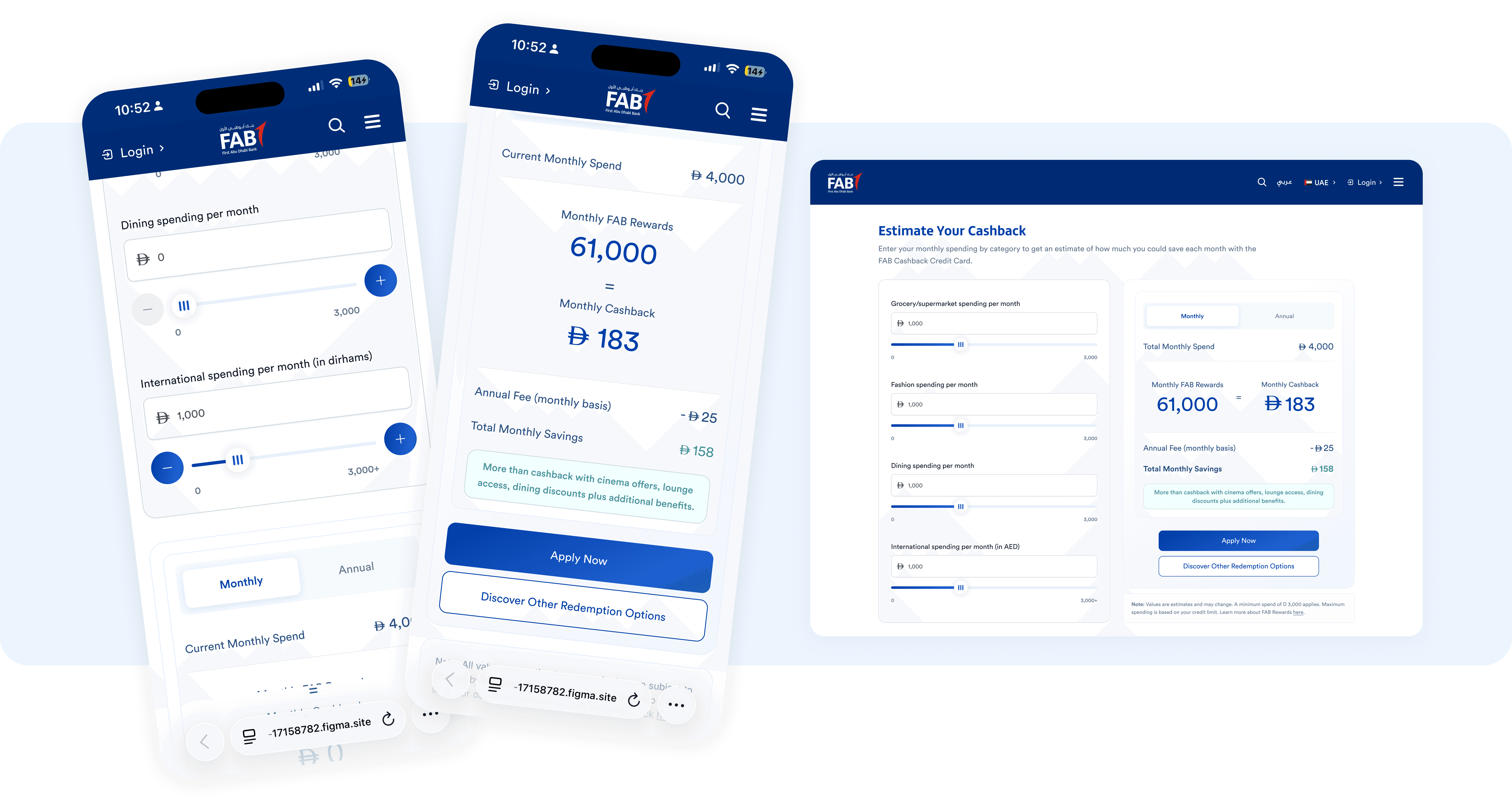
Change: A tab was introduced to allow users to switch between monthly and annual estimates of all defined values based on their preference improving consistency within a single screen.
3
Calculating total spend
Participants wanted to understand how their total spend contributed to the reward calculation.
Change: The interface was updated to display total monthly spending alongside estimated rewards.
FINAL DESIGN
DESIGNING A SCALABLE SYSTEM
Reward logic, rates, and thresholds were structured so they could be configured through the CMS rather than hard-coded, allowing the component to adapt to future product changes.
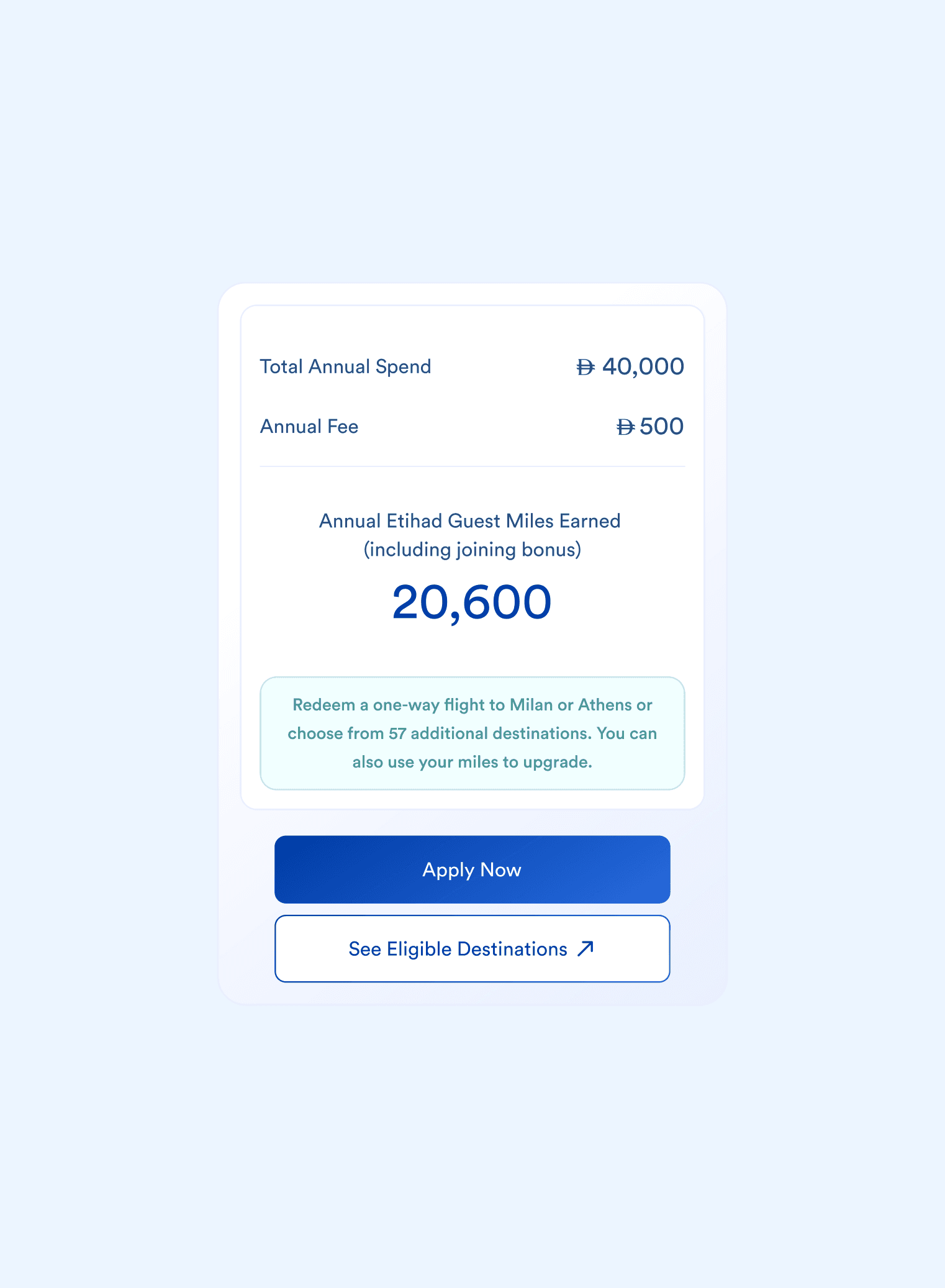
Each credit card had slightly different reward mechanics, including varying reward rates, caps, and bonus categories. To support multiple card variants, the calculator was designed as a reusable component rather than a card-specific feature.
MEASUREMENT FRAMEWORK
To evaluate the impact of the calculator after launch, we defined several success metrics in collaboration with the analytics team.
These included:
-
Calculator Interaction Rate
Percentage of users who interacted with the calculator, indicating interest and customer adoption.
-
Click-through rate to web application
Rate at which users initiated a credit card application after using the tool assessed using the number clicks on the primary CTA on the component.
-
Click-through rate to completing application
Rate at which users complete a credit card application after using the tool in comparison to those who did not do so.
Together, these metrics would help determine whether the calculator improved customer understanding and supported more confident application decisions.
LEARNINGS
Because this was my first project with full autonomy, one of the key skills I developed was adapting presentations for different audiences.
I learned to engage stakeholders earlier to understand their assumptions, motivations, and what decisions they needed to make. This allowed me to tailor decks more effectively—focusing on the insights and implications most relevant to them rather than presenting every design detail.
AMANDA PINTO